Formulas
Formulas are the core of Labgrind. They are what Labgrind helps you create and manage.
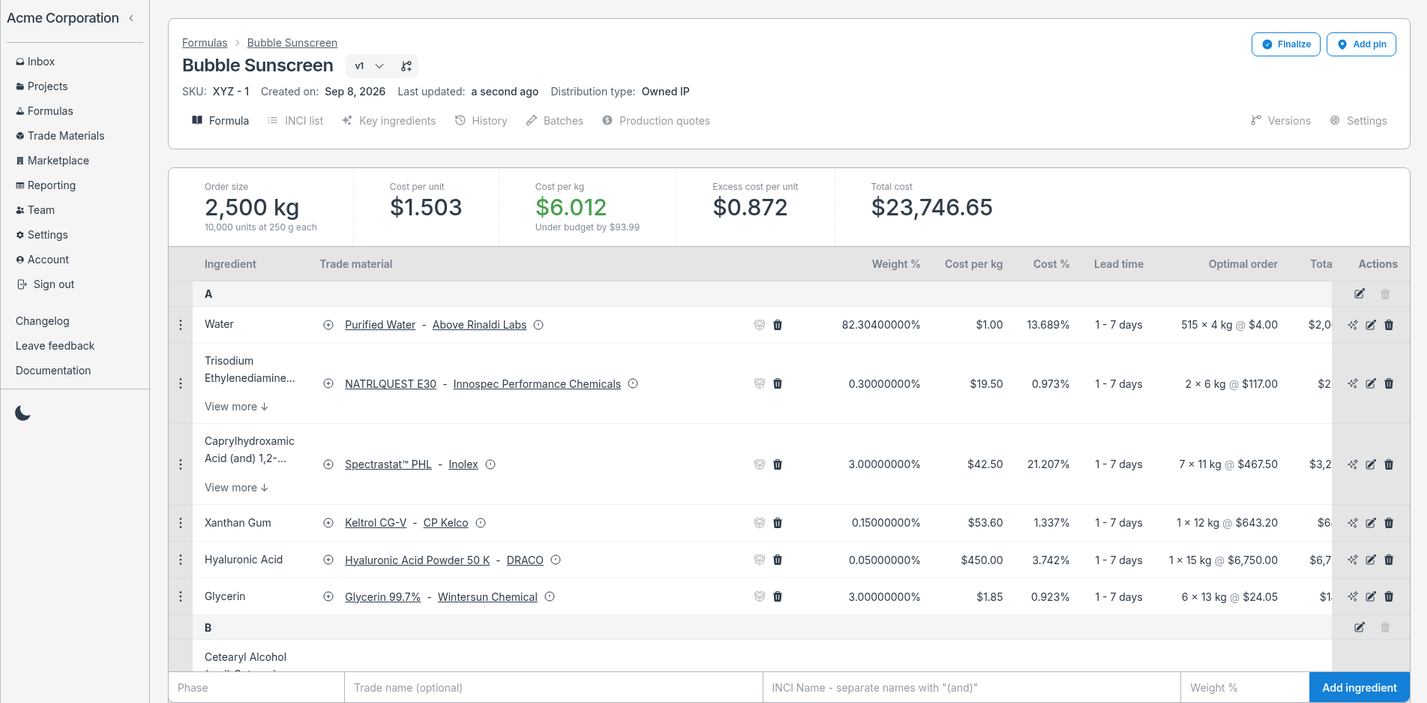
Every formula contains:
- Phases
- Ingredients
- Materials
Phases contain many ingredients and each ingredient can have both selected and alternative materials added to them.
Adding materials to ingredients
Ingredients on their own are just a placeholder you can add materials to.
A material is something you can actually buy in the real world. At the end of the day, you will need to source your ingredient from some kind of supplier. That's the purpose of a material.
At least one material would be selected at any given time. This primary material is acting as the real source of truth for the INCI name and chemical composition that is used in the rest of the formula.
Additionally, multiple alternative materials can be added along side your selected material. These add information to your formula to allow you to compare competing materials you might buy from different suppliers. These do not change the composition of the formula until they are promoted to selected.
To create a batch for a formula, each ingredient must have a selected material on it. You can preview unfinished formulas as a batch but you can not save them until all ingredients have a selected material.
Version control
Every formula is built up as a series of events that have happened. Each event is recorded and can be replayed to give you the current state of the formula.
This enables you to time travel to any point in a formula and make a version.
Before Labgrind, you might save these as different files in a project folder. Instead, in Labgrind you would create a new version from some point in the formula's history.
These versions then have their own history that you can experiment with. Changes on one version will not affect other versions. Batches you make on the version are specific to that version.
Only one version can be the master version of a formula. This is designed to be the latest good copy. After experimenting on a version you can promote it to the master version if you are happy with the changes.
History
Every action anyone takes on a formula is recorded in the history. This is what gives you the ability to time travel and create versions.
Each event will show up in a timeline with a quick description and information about the user who performed the change.